Website design for manufacturers comes down to one job: help a buyer decide fast that you can make the part, then make it easy to ask for a quote. Looks matter less than clarity. A plain site that says what you make, shows proof and has a short RFQ form beats a pretty one that hides all three.
Your website is also where every other channel ends. Ads, trade show follow-ups, search and email all send buyers to it. If it fails, you paid for traffic that leaves. This guide gives you an 8-point checklist, shows what the top 100 manufacturing sites get right and wrong, and covers speed, mobile and exporters. For the search side, read my SEO for manufacturers guide next to it.
Why your website matters more than your social feed
A Thomas survey of 266 industrial buyers found that 73% focus on the company website when judging a supplier, and only 10% focus on social media. The survey is from 2019, so read it as a direction, not a precise number. Buyers decide on your site. That’s why I tell factories to fix the site before they spend on social media.
What the top 100 manufacturing websites have and miss
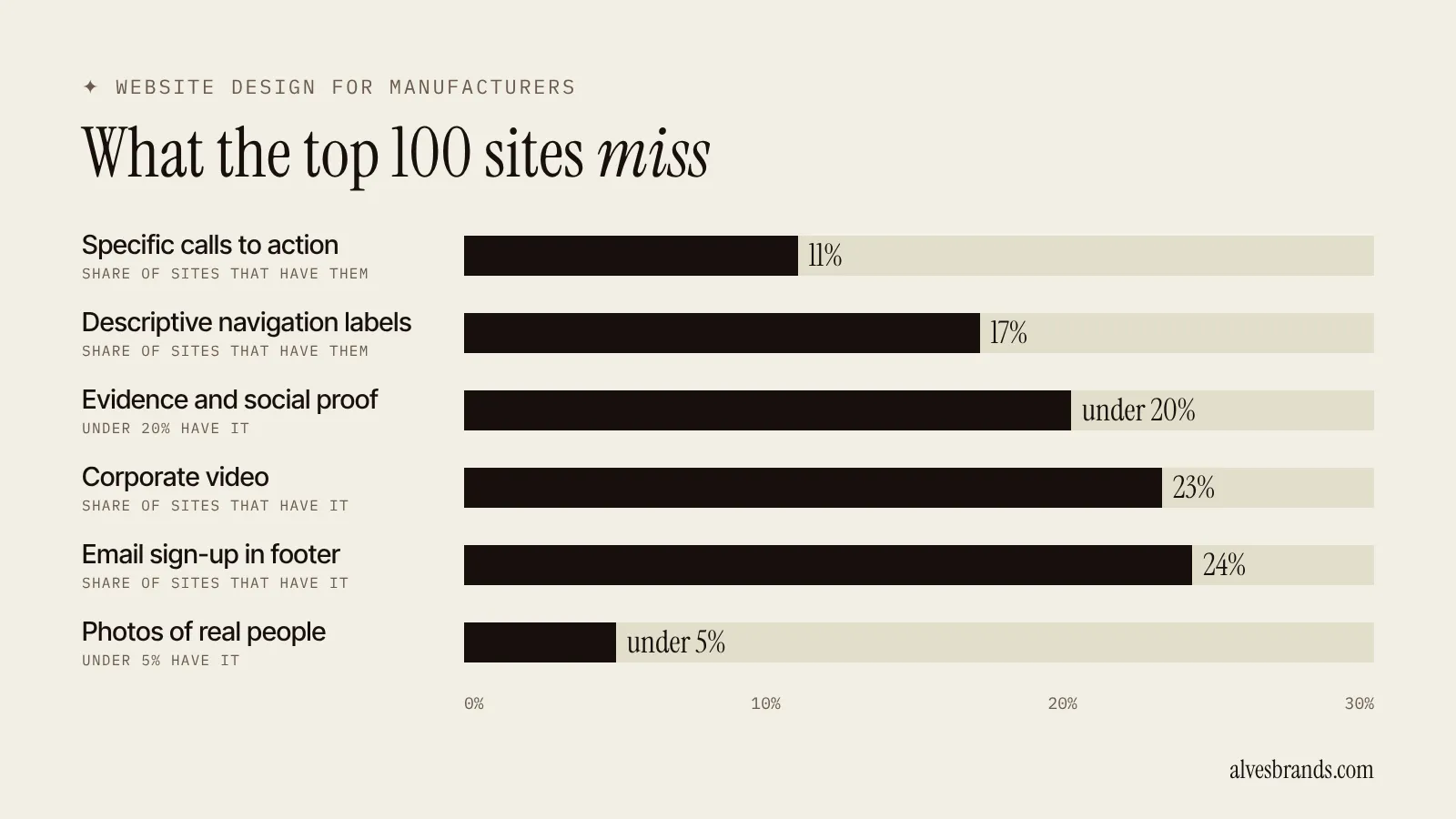
Orbit Media looked at 100 top manufacturing websites (published January 2024). The numbers show where even big companies lose buyers.
| Most sites have | Share |
|---|---|
| Logo top left | 100% |
| Main navigation in the header | 88% |
| Specific title tag | 78% |
| Search field in the header | 70% |
| Responsive design on mobile | 68% |
| Most sites miss | Share that have it |
|---|---|
| Descriptive navigation labels | 17% |
| Specific calls to action | 11% |
| Corporate video | 23% |
| Email sign-up in the footer | 24% |
| Evidence and social proof | under 20% |
| Photos of real people | under 5% |
The gap is clear. Big manufacturers get the basics in place and then skip the things that win trust: proof, people and a clear next step. That’s your opening. A smaller factory can beat them on those three things without a big budget.
Website design for manufacturers: the 8-point checklist
1. Say what you make in the first screen
A buyer should know in five seconds what you make, for whom and where. Write one plain headline: “Precision CNC parts for medical device makers.” Orbit Media found only 51% of top manufacturing sites have a descriptive headline. Skip slogans like “Engineering the future.”
2. Build the menu around what buyers look for
Name menu items after products, materials, industries or services. “Services and more” tells nobody anything. Only 17% of the top 100 sites used descriptive navigation labels, so a clear menu is an easy win. Keep it to five or six items and put “Request a quote” in the header.
3. Give every product and capability its own page
One page per product family, process or industry. Each page needs:
- A plain description of what you make and who it’s for.
- Specs, materials, tolerances and sizes in a table.
- Downloads: datasheets, CAD files, certificates.
- Photos of real parts, not stock images.
- One clear button to ask for a quote.
These pages are also what Google shows when a buyer searches “custom stainless steel fittings supplier.” No page, no ranking.
4. Show proof on the page
Put case studies, customer logos, certificates and numbers where buyers decide. Orbit Media found that evidence and social proof appeared on under 20% of top sites, and real photos of people on under 5%. Add a photo of your team and your shop floor. Buyers want to know a real factory sits behind the site.
5. Make the RFQ form short
Ask for name, email, company, what they need and the quantity. Nothing else. Put the phone number and a WhatsApp link next to the form. Test it on your phone before you publish. A form that fails on mobile loses quotes you never see.
6. Make it fast
Google’s Core Web Vitals set the targets for a good page, measured at the 75th percentile of visits:
| Metric | Good |
|---|---|
| Largest Contentful Paint (loading) | 2.5 seconds or less |
| Interaction to Next Paint (response) | 200 milliseconds or less |
| Cumulative Layout Shift (visual stability) | 0.1 or less |
The usual culprits on factory sites are huge product photos, heavy sliders, autoplay video and too many plugins. Compress the images, drop the slider and keep the video below the fold.
7. Design for the phone first
Google indexes and ranks the mobile version of your content. So if a table, a spec or a button only shows on desktop, Google doesn’t count it. Orbit Media found only 68% of top manufacturing sites responsive. Check your own site on a real phone. Can you read the spec table? Can you tap the quote button?
8. Fix the basics that block people
The WebAIM Million report (February 2026) found 95.9% of home pages have detectable accessibility failures, with an average of 56.1 errors per page. The most common are low-contrast text (83.9% of pages), missing image descriptions (53.1%) and missing form labels (51%). These hurt every buyer who reads in sunlight or on a small screen, not only people with disabilities. Fix contrast, add alt text and label your form fields.
What each page type should show
| Page | What it must show |
|---|---|
| Homepage | What you make, who for, one proof point and the quote button |
| Product or capability page | Specs, materials, photos of real parts, downloads and an RFQ button |
| Industry page | The problems that industry has and the parts you made for it |
| Case study | The problem, what you made, the result in numbers and a customer quote |
| About page | Real photos of the team and plant, years in business, certificates |
| Contact page | Short form, phone, WhatsApp, address and hours |
If a page type is missing, that’s usually where buyers drop off. Start with the product pages, then add the case studies.
Make the site easy for Google to read
Good website design for manufacturers includes the plumbing. Check these once:
- One H1 per page, with the main keyword in it.
- A title tag and meta description written for each page, not copied.
- Clean URLs like /products/cnc-turned-parts/.
- Descriptive link text, not “click here.”
- A sitemap in Search Console and a fast, error-free crawl.
- Schema markup for your company, products and FAQs.
My technical SEO service covers all of this, and the SEO audit shows what’s broken on your site in five working days.
Website design for manufacturers that export
If your buyers are abroad, the site needs more:
- Language versions. Buyers search in their own language. Use separate URLs for each language and link them with hreflang. The multilingual website checklist shows what to translate first.
- Export facts on the page. Certificates, shipping terms, minimum orders, payment terms and the countries you’ve already shipped to.
- A clear contact path. Time zones, WhatsApp and a reply promise.
- Pages foreign buyers actually search for. My guide on how foreign buyers find suppliers explains what they type.
Redesign or fix? Signs you need a new site
Not every weak site needs a rebuild. Fix it if the problems are the message, the RFQ form or the page speed. Rebuild if you see these:
- The site isn’t responsive, and buyers can’t use it on a phone.
- You can’t edit pages without calling a developer.
- It’s slow even after you compress images.
- The structure makes it impossible to add product pages.
- You’re about to add a new market and need language versions.
Before you hire anyone, write a one-page brief: who your buyers are, what you want them to do and what the site must show. Ask for a clear scope, a fixed price and a plan for redirecting your old URLs, so you keep the rankings you already have.
Mistakes to avoid
- Starting with colors and logos. Start with what buyers need to see.
- Hiding the quote button. One click from every page.
- Stock photos. They tell buyers you have nothing real to show.
- A slider on the homepage. It slows the page and hardly anyone watches it.
- A site only in English when your buyers aren’t.
- No tracking. Without it you can’t tell which page brings RFQs.
How to measure the result
Count these each month:
- RFQs and calls from the site, by page.
- Form completion rate on mobile and desktop.
- Core Web Vitals in Search Console.
- Pages that rank and bring visitors.
- Time from first visit to first quote request.
Ask every new customer, “How did you find us?” and write the answer down. Then use the numbers to decide which product page to improve next. A content plan feeds the site, and the lead generation guide shows how a page turns a visit into an RFQ.
Engineering firms have their own page needs: see marketing for engineering firms.
Each product needs its own page: read SEO for product pages and see the manufacturing SEO services.
Frequently asked questions
What makes a good manufacturing website?
A good website for a manufacturer says what you make in the first screen, has one page per product or capability, shows proof and makes the RFQ easy. It also loads fast and works on a phone.
What pages does a manufacturing website need?
A homepage, one page for each product family or capability, industry pages if you serve several, case studies, an about page with real photos, a certifications page and a contact or RFQ page.
How fast should a manufacturing website load?
Aim for Google’s “good” Core Web Vitals: Largest Contentful Paint at 2.5 seconds or less, Interaction to Next Paint at 200 milliseconds or less and Cumulative Layout Shift at 0.1 or less.
Should a manufacturing website have a blog?
Yes, if it answers questions buyers ask before they pick a supplier. Orbit Media found under half of top manufacturing sites show blog content on the homepage, so there’s room to stand out.
How do I design a manufacturing website for exporters?
Build separate language versions, link them with hreflang and put export facts on the page: certificates, shipping terms, minimum orders and countries served.
How long does it take to see results from a new website?
Conversion changes, like a shorter RFQ form, can show in weeks. Search rankings for new pages usually need three to six months.
Not sure what your website shows buyers? Ask me for a free website check. I’ll show you what they see and what to fix first.