SEO for product pages is the work of making each product page easy for Google to find, read and rank, and easy for a buyer to act on. You pick one search per page, put it in the right places, show the facts a buyer checks, and add a way to ask for a quote.
Most guides on this topic are written for online shops that sell shirts and phones. This one is for companies that sell machines, parts, materials and bulk goods, where the buyer is an engineer or a purchasing manager and the sale ends with a request for quote. If you want me to do it for you, see my manufacturing SEO services.
What is SEO for product pages?
It means optimising each product page so it ranks for the searches buyers use when they look for that product. A product page has one job: to match one search and turn the visit into a sale or a quote request.
Good SEO for product pages has four parts:
- A search to target. One main keyword, checked on Google.
- Clear content. Title, headings, description, specs and images that match the search.
- Technical health. The page is indexed, fast, on mobile and marked up with schema.
- A next step. A button, a form or a phone number that is easy to find.
Why SEO for product pages matters for manufacturers
A buyer who searches for "304 stainless steel sheet supplier" is close to a decision. The product page is the page they will print, share and compare. A Thomas survey of 266 industrial buyers found 73% focus on the company website when judging a supplier. 6sense found buyers are nearly 70% through the process before they contact a seller.
If your product has no page of its own, or the page is a table of codes with no words, you lose the search to a competitor whose page answers it.
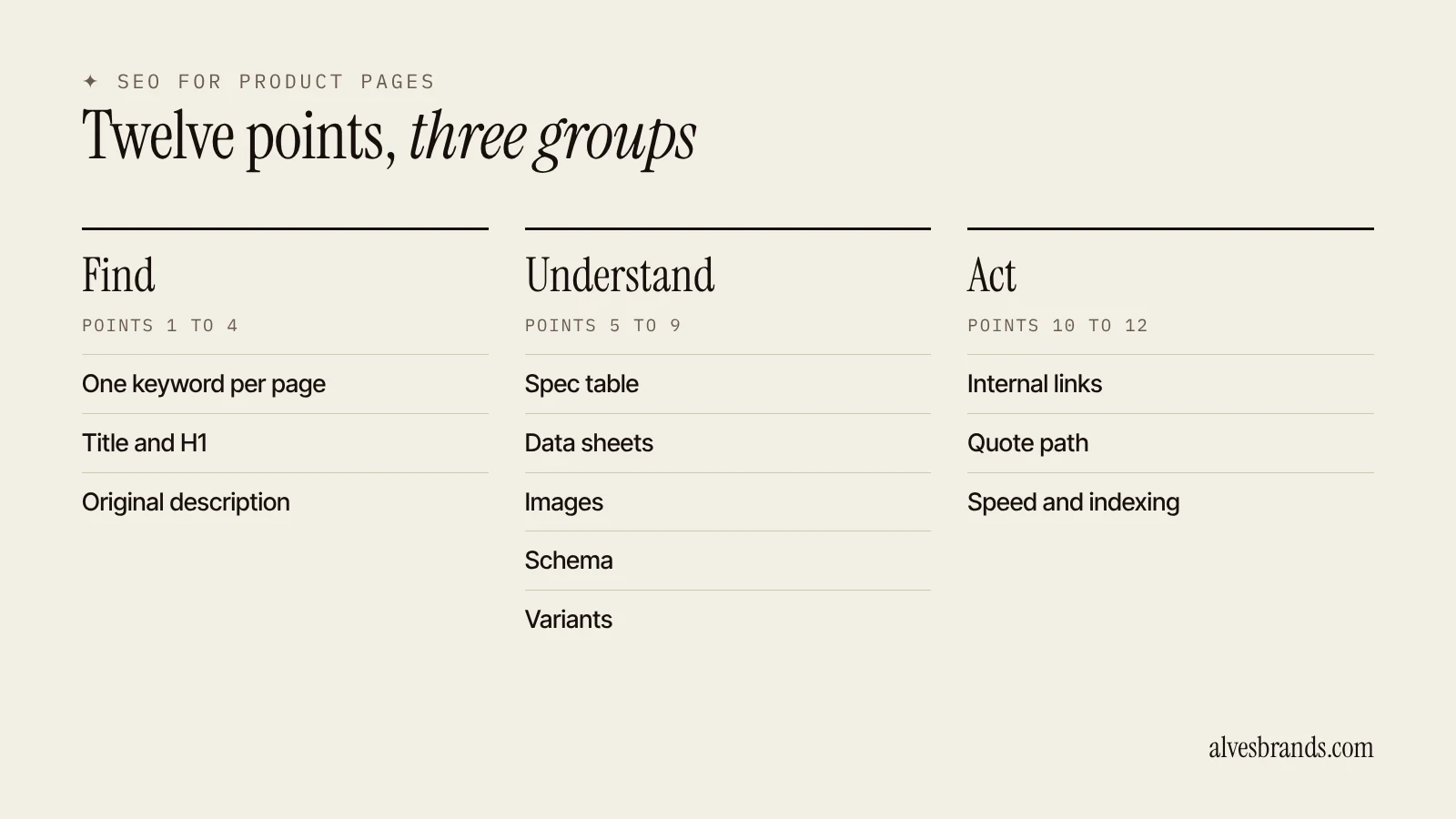
SEO for product pages: industrial catalogs vs e-commerce
Standard advice on SEO for product pages assumes a shopper, a price and a cart. Industrial catalogs work differently.
| E-commerce shop | Industrial catalog |
|---|---|
| Buyer is a consumer | Buyer is an engineer, a purchaser or a group of both |
| Price is shown, buy now | Price is "on request", the goal is an RFQ |
| One image and a short description | Specs, tolerances, drawings and certificates |
| Variants by colour and size | Variants by grade, size, finish and standard |
| Reviews drive trust | Certificates, standards and references drive trust |
| Short buying cycle | Long cycle, often months |
So the page must carry more facts and fewer slogans. The buyer wants to know whether the product fits, whether you pass their audit and how fast you can deliver.
The 12 points of SEO for product pages
1. Pick one keyword for each page
Choose the main search for the page before you write. Look at the Google results for that search. If they show product pages from sellers, build a product page. If they show guides, the search is informational and a guide is the right page.
Two product pages must not target the same search. If you sell 304 and 316 stainless sheet, each grade gets its own page and its own keyword. Search Google for both. If the results are the same pages, one page can serve both. If they differ, make two.
Good product keywords have three parts: the product, a spec or a use, and a buyer word.
| Part | Example |
|---|---|
| Product | stainless steel sheet |
| Spec or use | 304, 2B finish |
| Buyer word | supplier, manufacturer, wholesale |
2. Write a title that matches the search
The title is the blue link in Google. Google can rewrite it, but a clear title is more likely to stay as you wrote it. Google’s guidance on title links says to make each title unique and descriptive and to avoid vague or stuffed titles.
A formula that works for products: main keyword first, then the benefit or qualifier, then your brand.
- Weak: Products | Acme
- Better: 304 Stainless Steel Sheet Supplier: Cut to Size | Acme
Keep it near 60 characters so it is not cut off.
3. Use one H1 and a clear heading order
Use one H1, the product name with the main keyword. Then use H2s for the parts a buyer checks, such as Specifications, Applications, Certificates, Lead time and Ordering. Do not skip levels.
Do not turn the whole page into H2s to fit keywords. Headings are there to help a buyer scan.
4. Write a description that answers buyer questions
Do not paste the manufacturer’s text. A page that copies another page gives Google no reason to rank it. Write a short intro that says what the product is, who uses it and why you are a good supplier. Then answer the questions engineers ask:
- What is it made of, and to which standard?
- What sizes, tolerances and finishes are available?
- What are the minimum order, the lead time and the packaging?
- Which industries use it?
- What certificates do you hold?
- Can you make it to a drawing?
Use plain words and short sentences. Keep the facts exact and only publish what you can prove.
5. Show specs in a table
Buyers compare specs. Put them in an HTML table, not in an image. Google reads tables, AI assistants can quote them and buyers can scan them.
| Spec | Value |
|---|---|
| Material | Stainless steel 304 |
| Thickness | 0.5 to 6 mm |
| Finish | 2B, BA, brushed |
| Standard | ASTM A240 |
| Lead time | Stated in days |
| Minimum order | Stated in units |
Use the real values from your price list. Never publish figures you cannot back up.
6. Add data sheets, drawings and CAD files
Industrial buyers send a data sheet around the office before they send an enquiry. Put a PDF data sheet on every product page and link it with a clear anchor like "Download the 304 stainless sheet data sheet (PDF)". Google lists PDF among the file types it can index, so a data sheet can rank on its own and bring buyers to the page.
Tips:
- Give the file a clear name, such as 304-stainless-steel-sheet-data-sheet.pdf.
- Put real text in the PDF, not a scanned image.
- Link the PDF from the product page and the page from the PDF.
- If you have CAD files, offer them next to the data sheet.
7. Optimise the images
Use real photos of your product and your plant, not only stock images. Give each image a descriptive file name and alt text that says what is shown, for example "304 stainless steel sheet in 2B finish, cut to size". Google’s image guidance recommends descriptive alt text and file names. Use WebP, keep files small and set width and height so the page does not jump while loading.
8. Add product structured data
Structured data tells Google what the page is. Google documents product structured data, and it can help your page appear with richer results where it qualifies. Use JSON-LD and only mark up what the page really shows. If the price is "on request", do not publish a fake price in the markup.
A basic example:
``` { "@context": "https://schema.org", "@type": "Product", "name": "304 Stainless Steel Sheet", "description": "Cold-rolled 304 stainless steel sheet, 0.5 to 6 mm, cut to size.", "brand": { "@type": "Brand", "name": "Your Company" } } ```
Check the markup in Google’s Rich Results Test before you publish.
9. Handle variants and filters
Many industrial catalogs have the same product in many sizes and grades. That is where duplicate and thin pages appear.
| Situation | What to do |
|---|---|
| Same product, many sizes | One page with a size table, not one page per size |
| Different grades with their own search | One page per grade |
| Filter pages that make endless URLs | Block or canonicalise them so they do not flood the index |
| Out-of-stock or discontinued item | Keep the page if it still gets visits and link to the replacement |
Give each product page a rel="canonical" that points to itself, and make sure the version you want indexed is the one in your sitemap.
10. Build internal links in both directions
Link from the product page to related products, the category page, a guide that helps the buyer choose, and the contact page. Link to the product page from the category, from guides and from the home page.
Use anchors that describe the page, such as "304 stainless steel sheet", not "click here". A product page that no other page links to is hard for Google to find and rank.
11. Make the quote path obvious
A buyer who finds the page must be able to ask in one step. Put a short form and a phone or WhatsApp button near the top of the page, not only at the bottom. Ask for the few things you need: name, company, product, quantity and country. Show a thank-you message and tell the buyer when to expect a reply.
Test the form on a phone. Many B2B buyers read the first page on mobile and ask later from a desktop.
12. Check speed, mobile and indexing
A slow page loses visits before the buyer sees the specs. Check that the page loads fast on mobile, that the text is readable without zooming and that the page is indexed. Use Google Search Console’s URL inspection to see if the page is in the index and to request indexing after changes.
The anatomy of a product page that ranks
Here is the order I use for SEO for product pages in an industrial catalog, from top to bottom. Each block has a job.
| Block | What goes in it | Job |
|---|---|---|
| Header | H1 with the product name and main keyword, one-line use, main image | Confirms the buyer is on the right page |
| Quick facts | Material, standard, sizes, lead time, minimum order | Lets an engineer decide in ten seconds |
| Quote box | Short form, phone or WhatsApp button | Catches the buyer who is ready |
| Description | Two or three short paragraphs: what it is, who uses it, why you | Gives Google text to rank and buyers a reason to trust |
| Spec table | Full specifications in HTML | Answers the detailed questions |
| Downloads | Data sheet, drawing, certificate, CAD | Gets shared inside the buying group |
| Applications | Industries and uses, with a link to the guide or case page for each | Matches searches by use |
| Related products | Links to the next size, grade or accessory | Keeps the buyer on your site and helps Google find pages |
| FAQ | Four to six real questions with short answers | Matches question searches and AI answers |
| Final quote prompt | Second form or button | Catches the buyer who read everything |
You do not need every block on every page. A simple fastener needs fewer blocks than a machine. But keep the order: facts first, proof next, contact always in reach.
Before and after: a weak product page and a strong one
Here is SEO for product pages in practice, using a page for stainless steel sheet.
Before:
- Title: "Sheets | Acme Steel".
- H1: "Product 14".
- Text: two lines copied from the mill’s catalog.
- Specs: a photo of a printed table.
- No data sheet, no form, no links to other pages.
After:
- Title: "304 Stainless Steel Sheet Supplier: Cut to Size | Acme Steel".
- H1: "304 stainless steel sheet".
- Text: a short original description, the uses and what makes the supply reliable.
- Specs: an HTML table with thickness, finish, standard and lead time.
- A PDF data sheet, a quote form near the top and links to the 316 page and the sheet cutting service.
The "after" page costs a few hours of work for each product. It is the page Google can read and a buyer can use.
Questions buyers ask that your page must answer
SEO for product pages starts with the questions buyers check before they write to you. If your page does not answer them, they leave for a page that does.
- Does it fit my need? Material, size, tolerance, standard.
- Can you prove quality? Certificates, test reports and audit records.
- When can I get it? Lead time, production capacity, shipping.
- How much do I have to buy? Minimum order and price breaks.
- Can you ship to my country? Export markets, Incoterms and documents.
- Who do I talk to? A name, a phone number and a reply time.
Write these answers in plain words, with exact numbers. If the lead time changes, say so and date it.
How to scale product page SEO across a big catalog
SEO for product pages on a big catalog cannot mean writing every page from scratch. Work in groups:
- Group the catalog by product family, such as valves, fittings and flanges.
- Pick the top products in each family by margin and by search demand. Write these pages by hand.
- Build a template for the rest. It fills the title, H1, spec table and downloads from your data, and leaves space for a short human-written paragraph.
- Add a unique paragraph to every template page. A page with only data from a feed is a thin page and may not rank.
- Index with care. Put only pages with real content in your sitemap. Block filter and search result pages that create endless URLs.
- Review each quarter. Look in Search Console for pages with impressions and no clicks, and improve those first.
This keeps quality high where money is made and avoids flooding Google with pages that add nothing.
Internal links: the product page’s support system
In SEO for product pages, a page ranks better when the site shows Google that it matters. Link to it from:
- Its category page, with the product name as the anchor.
- A guide that helps the buyer choose, for example "how to choose a stainless steel grade".
- Related product pages, the next grade or size.
- The home page, if it is a main product.
- Your service pages, when the product is the result of the service. For example, my SEO for exporters page links to the guides that help exporters choose what to publish first.
If you have a blog, write a guide for each product family and link it to the product pages. The guide ranks for the question, and the product page ranks for the sale.
SEO for product pages checklist
- One main keyword per page, checked on Google.
- Title near 60 characters with the keyword first.
- One H1 with the keyword and logical H2s.
- Original description with specs, uses and certificates.
- Specs in an HTML table.
- PDF data sheet linked on the page.
- Descriptive file names and alt text on images.
- Product structured data that matches the page.
- Variants handled without duplicate pages.
- Internal links in and out.
- Quote form and phone or WhatsApp button near the top.
- Page indexed, fast and readable on mobile.
Common mistakes in SEO for product pages
- Copying the maker’s description word for word.
- Putting specs in an image so Google cannot read them.
- Writing "Product 1, Product 2" as titles.
- Making one page per size, so 300 thin pages compete.
- Giving two pages the same keyword.
- Hiding the contact form three scrolls down.
- Publishing a made-up price in structured data.
- Leaving old products live with broken links.
How to measure SEO for product pages
Use Google Search Console. Filter by page and look at queries, impressions, clicks and average position for each product page. Pages with impressions but few clicks need a better title. Pages with clicks but no enquiries need a clearer quote path.
Then track quote requests by landing page. Ask in the form "How did you find us?" and save the page the visitor came from. After three months you will see which product pages earn money, and you can copy what they do to the others.
Product pages and AI search
Buyers also ask ChatGPT, Gemini and Perplexity for suppliers. These tools quote clear, factual pages. A product page with a spec table, a named standard and your company details is easier to cite than a page of slogans. Google says there are no extra requirements for AI features beyond helpful, indexable pages. Read how to get recommended by ChatGPT for the steps. Want to see how you show up today? Run the free AI visibility check.
Where to start
Do not try to fix 500 pages at once. SEO for product pages pays fastest when you begin with your best sellers. Start with the five products where a new order pays the most. Follow the twelve points for those pages, then move to the next five. If you want SEO for product pages done and reported in quote requests, read about my manufacturing SEO services or compare packages on the services page. For the bigger picture, read my guide to SEO for manufacturers and my guide on website design for manufacturers.
Run the manufacturing SEO checklist on the rest of your site.
Frequently asked questions
What is SEO for product pages?
It’s the work of making each product page rank for the searches buyers use and turn visits into sales or quote requests. It covers keywords, titles, content, images, structured data, links and the quote path.
How do I do keyword research for a product page?
List the product, a spec or use and a buyer word, then search each phrase on Google. Build a product page when the results are seller pages. Give each page its own keyword.
How long should a product page be?
Long enough to answer a buyer’s questions. For an industrial product that usually means a short intro, a spec table, applications, certificates and lead time. Do not add words only to reach a number.
Should I put prices on industrial product pages?
If you can, yes, because it filters buyers. If the price depends on quantity or drawings, say so and make the quote form easy. Never publish a price you will not honour.
Do PDF data sheets help SEO?
Yes. Google can index PDFs, buyers share them, and a good data sheet can bring visits to the product page. Use real text and a clear file name.
How do I avoid duplicate content with many variants?
Use one page with a size or grade table when the buyer searches for the product as a whole. Make a separate page only when a variant has its own search. Use canonical tags for filter pages.
Do I need product schema?
It is not required, but it helps Google understand the page and may help it show richer results. Mark up only what the page shows.
How long does it take for product pages to rank?
New pages can be indexed in days. Rankings usually take weeks to months, and quote requests from search often follow after three to six months.
Want your product pages to bring quote requests? Ask me for a free website check. I’ll show you which five pages to fix first.