Multilingual SEO is the work of making your website rank on Google in more than one language. You publish a full version of each important page in each language, you research the words buyers use in that language, and you tell Google which version is which.
If your buyers are in other countries, multilingual SEO is how they find you. Importers search in their own language, and a site that only speaks English misses many of them. This guide shows the steps in order, with examples you can copy. If you want help doing it, see my multilingual SEO services. For a shorter list, read my multilingual website checklist.
What is multilingual SEO?
Multilingual SEO means optimising a site for search in several languages. The site shows the same offer to people who speak different languages, and each version is built to rank in its own language.
Google separates two ideas. A multilingual website offers content in more than one language, such as a Canadian business with English and French versions. A multi-regional website targets users in different countries, such as a manufacturer that ships to both Canada and the United States. Some sites are both.
| Term | What it means | Example |
|---|---|---|
| Multilingual | Several languages | A site in English, Spanish and Turkish |
| Multi-regional | Several countries | A site for the US and the UK, both in English |
| International SEO | The wider job of ranking in other countries | Both of the above, plus links and local signals |
Multilingual SEO is one part of international SEO. If you target countries more than languages, read my international SEO page.
Why multilingual SEO matters
- Buyers search in their own language. An importer in Spain searches "proveedor de aceite de oliva a granel", not your English product name.
- It builds trust. A page in the buyer’s language, with their terms, looks like a company that wants their business.
- It gives Google a page to show. Google tries to find pages that match the language of the searcher. If no page matches, you do not appear for that search.
- It matches how buyers research. 6sense found buyers are nearly 70% through the process before they contact a seller. That research happens in their language.
- It helps with AI search. ChatGPT, Gemini and Perplexity answer in the language of the question. A clear page in that language gives them something to name. See how to get recommended by ChatGPT.
Step 1: Choose your markets and languages
In multilingual SEO, do not translate the whole site into ten languages. Pick the markets where buyers already ask for you or where your product fits best.
| Signal | Where to look |
|---|---|
| Orders and enquiries by country | Your sales records and quote requests |
| Visits by country | Google Search Console and analytics |
| Searches in other languages | Google Search Console, queries in other languages |
| Competitors in that market | A Google search in that country |
| Your ability to serve them | Shipping, support language, certificates |
Start with one or two languages. Add a third only when the first two bring enquiries. Translate the pages that bring enquiries first: your home page, your main product or service pages and your contact page. Guides come later. You can test your own site with the free website enquiry check.
Remember the difference between language and country. Spanish for Spain and Spanish for Mexico are close but not the same, and a buyer in Mexico may use other words and expect other prices. If you target one country, say so on the page.
Step 2: Do keyword research in each language
Do not translate your English keywords. Research each language on its own, because buyers do not search in translations. They use their own words, and the volume can be very different.
| Product | A typical buyer search | Language |
|---|---|---|
| Olive oil | proveedor de aceite de oliva a granel | Spanish |
| Textiles | Textilhersteller Türkei Großhandel | German |
| Furniture | fornecedor de móveis para importação | Portuguese |
| Machinery | packaging machine supplier for export | English |
How to do it:
- List what you sell in plain words, then ask a native speaker how a buyer would search for it.
- Search on Google in the target country and read the results. Do the results show service pages, product pages or guides? Build the page type Google shows.
- Check the tools. Use Google Search Console for real queries and a keyword tool for volume. Volume for small markets can look like zero even when a search leads to an order, so judge by the results page too.
- Group by results. If two keywords bring up the same results, one page can serve both. If the results differ, make two pages.
- Keep a keyword sheet per language. One column for the keyword, one for the page and one for the status.
Step 3: Pick your URL structure
Use a different URL for each language. Google recommends different URLs for each language version of a page, and not cookies or browser settings to switch the content. Pages that change by cookie or by the visitor’s location may not be crawled in every version, because Googlebot usually comes from the USA and does not send a language preference.
Google lists four options:
| Structure | Example | Pros | Cons |
|---|---|---|---|
| Country domain (ccTLD) | example.de | Clear country target, easy to separate | Costly, more infrastructure, one country only |
| Subdomain | de.example.com | Easy to set up, different servers possible | Users may not read the code as a language or a country |
| Subfolder | example.com/de/ | Easy to set up, one host to maintain | Users may not recognise the target, one server location |
| URL parameter | example.com?loc=de | Not recommended by Google | Hard to segment, unclear to users |
For most exporters, subfolders are the best choice. They are simple, they keep all your links and authority on one domain, and you can add a language in a day. This site uses subfolders, for example /es/ and /ru/. Choose a country domain only if you plan separate sites for separate countries and have the budget.
It is fine to use words in the local language in the URL. Use UTF-8 and escape characters properly when you link to the page.
Step 4: Translate and localise the content
Translate every part of the page that a buyer reads: the title, the headings, the body, the buttons, the form, the image text and the alt text. Google says that if you translate only the boilerplate and keep the bulk of the content in one language, that can create a bad user experience.
Localising goes further than translating:
- Use the words buyers search, from your keyword research.
- Show the local currency, date format and units when they matter.
- Name the local standards and certificates that buyers check.
- Add a local phone number or address if you have one.
- Change examples and references that only make sense in one country.
Machine translation. A machine can give you a first draft, but a native speaker should read it before you publish. Google’s guidance on generative AI content says automation is fine when it produces helpful content, but using it to create many pages with no value breaks its spam policies. A page nobody has read is a risk to your brand as well as to your ranking.
One language per page. Use one language for the content and the navigation on each page. Avoid side-by-side translations. Google uses the visible content to work out the page language, not the lang attribute or the URL.
Step 5: Add hreflang tags
Hreflang tells Google which pages are versions of each other, so it can show the right one to each searcher. Google supports three methods: HTML tags, HTTP headers and sitemaps.
Here is the HTML version for a page with English, Spanish and Turkish versions:
``` <link rel="alternate" hreflang="en" href="https://example.com/product/" /> <link rel="alternate" hreflang="es" href="https://example.com/es/product/" /> <link rel="alternate" hreflang="tr" href="https://example.com/tr/product/" /> <link rel="alternate" hreflang="x-default" href="https://example.com/product/" /> ```
The rules, from Google’s guide to localized versions of your pages:
- Each version must list itself and all the other versions. If page A links to page B, page B must link back to page A.
- Use full URLs with https, not relative paths.
- Use the right codes. Language codes (es) or language and country codes (es-mx).
- Add x-default as the fallback for searchers whose language you do not cover, such as a language selector or a home page that redirects.
- Use one method. Tags, headers or sitemap, not a mix that can conflict.
Common mistakes: missing return links, wrong codes, pointing to redirected or noindex pages, and listing a version that does not exist.
Hreflang language and country codes
The language comes first, then an optional country. Language codes use ISO 639-1 and country codes use ISO 3166-1 alpha-2. You cannot use a country code alone.
| You want to target | Code |
|---|---|
| English, any country | en |
| Spanish, any country | es |
| Spanish for Mexico | es-mx |
| Portuguese for Brazil | pt-br |
| German | de |
| Turkish | tr |
| Russian | ru |
| Arabic | ar |
| Anyone else (fallback) | x-default |
Use a language-only code unless you have a real reason to split by country. If your Spanish page works for Spain and Mexico, "es" is enough. Split only when the offer, the price or the words change.
Hreflang in a sitemap or an HTTP header
Tags in the head are the easiest method, but they add weight to every page. On a large catalog, a sitemap is cleaner, because all the links live in one file. Each URL lists all of its versions, itself included:
``` <url> <loc>https://example.com/product/</loc> <xhtml:link rel="alternate" hreflang="en" href="https://example.com/product/" /> <xhtml:link rel="alternate" hreflang="es" href="https://example.com/es/product/" /> </url> ```
For files that are not HTML, such as a PDF data sheet, Google supports hreflang in the HTTP header. That is the only way to mark a PDF in another language. Pick one method per site and stick to it, so the signals never conflict.
Language or country: which one do you need?
Most owners mix the two up. The answer decides your URL structure and your hreflang codes.
| Your situation | What you need | Example |
|---|---|---|
| One product, several languages, one price list | Multilingual | A Turkish textile maker with English, German and Spanish pages |
| One language, several countries with different prices or rules | Multi-regional | An English site with pages for the US and the UK |
| Several languages and different offers by country | Both | Spanish pages for Spain and Mexico with different shipping terms |
If you are not sure, start with languages. It is simpler to add a country split later than to untangle one you did not need.
What to translate first on a manufacturing or export site
In multilingual SEO, do not start with the blog. Start with the pages that bring a quote request. In this order:
- Home page. It sets the language of the site for the buyer and for Google.
- Product or category pages. Titles, specs, units, certificates and lead times.
- Contact and quote page. The form, the button text and the thank-you message. A buyer who cannot read the form will not send it.
- About and trust pages. Certificates, factory details, export markets.
- Data sheets and catalogs. Make a PDF in each language and mark it with hreflang in the HTTP header.
- Guides. Only the ones that rank or bring leads in English.
Keep the units and terms the buyer expects. A German engineer searches for a standard by its German name, and a Spanish buyer may use a different word than a buyer in Argentina.
A simple translation workflow for a small team
Multilingual SEO does not need an agency to start. You need a process that a native speaker can check.
- Write the English page first and finish it.
- Do keyword research in the target language and pick the main search for the page.
- Make a draft with a translation tool, using the target keyword in the title, the first heading and the first paragraph.
- Ask a native speaker who knows your industry to edit it. They fix tone, terms and units.
- Check the page in the browser on a phone: menu, form, buttons and images with text.
- Add the hreflang tags and the language switcher.
- Submit the page for indexing in Google Search Console and check it a week later.
Keep a shared sheet with the English URL, the translated URL, the date and the owner. When you change the English page, you will know which translations to update.
Tools you need
These are the tools I use for multilingual SEO.
- Google Search Console for queries, countries, indexing and errors. It is free.
- A keyword tool for volume and difficulty in each language.
- A crawler to find missing hreflang return links and broken language links across the site.
- A native speaker for every language. No tool replaces this.
- A spreadsheet to map each keyword to one page per language.
Step 6: Make switching easy for users
Let people change the language with a link. Do not redirect them automatically based on what you think their language is, because redirects can stop users and search engines from seeing all versions. Add a clear language switcher on every page that links to the same page in the other language, not just to the home page.
Do not use IP analysis to change content. Google says IP location is difficult and generally not reliable, and it may not be able to crawl all variations.
Step 7: Build links in each market
A page in Spanish ranks better with links from Spanish-language sites. Ask for links in each market from:
- Trade associations and chambers of commerce in that country.
- Directories for your industry in that language.
- Local clients, partners and distributors.
- Trade magazines and blogs in that language.
Do not buy links. Google’s spam policies warn against it. See my link building page for how I do this.
Step 8: Measure and fix
Multilingual SEO results must be checked one language at a time.
- Search Console. Filter by country and by page folder to see impressions and clicks per language.
- Indexing. Make sure each version is indexed and not marked as a duplicate.
- Hreflang errors. Fix missing return links and wrong codes.
- Enquiries. Add a "How did you find us?" field to your form and see which languages bring leads.
- Rankings. Track your top keywords per language in the country you target.
Expect three to six months before new multilingual SEO pages rank. Keep publishing in the meantime.
Example: one product page in three languages
Say you make olive oil in Turkey and sell in bulk. Your English page targets "bulk olive oil supplier". Here is how the same product becomes three pages:
| Part of the page | English | Spanish | German |
|---|---|---|---|
| URL | /olive-oil/ | /es/aceite-de-oliva/ | /de/olivenoel/ |
| Main search | bulk olive oil supplier | proveedor de aceite de oliva a granel | Olivenöl Großhandel |
| Title | Bulk Olive Oil Supplier | Proveedor de Aceite de Oliva a Granel | Olivenöl Großhandel vom Hersteller |
| Units and terms | litres, tonnes | litros, toneladas | Liter, Tonnen |
| Hreflang | en and x-default | es | de |
The three pages have the same facts, but each one is written for its own search. The Spanish page is not a copy of the English one with Spanish words. It starts from what a Spanish buyer types and what a Spanish buyer wants to know first. Each page lists all three versions in its hreflang tags.
How to measure each language
Open Search Console and use the page filter. If your Spanish pages live under /es/, filter pages that contain "/es/" and read the queries, impressions, clicks and average position for that folder alone. Do the same for each language.
Look for three things:
- Pages with impressions but no clicks. The title or the description does not match what the searcher wanted. Rewrite it in the language of the query.
- Queries in the wrong language. If Spanish searches land on your English page, the Spanish version is missing, not indexed or not linked with hreflang.
- Countries you did not plan for. Impressions from a country you do not serve can show a new market. They can also show that you target the wrong language.
Then connect search to money. Add a question to your quote form, "How did you find us?", and record the language of the page where the form was sent. After three months you will know which languages bring quote requests and which only bring visits.
Multilingual SEO and duplicate content
Translated pages are not duplicates of the English page, because they are in another language. Duplicates appear when you have similar content in the same language on different URLs, for example example.de and example.com/de/ both in German. In that case, Google says to pick a preferred version and use rel="canonical" and hreflang to serve the right one.
Multilingual SEO and AI search
AI assistants answer in the language of the question. To be named, your pages in that language need clear, factual text: who you are, what you make, where you sell and how to contact you. Keep your company name, address and details the same in every language. Google says there are no extra requirements for AI features beyond helpful, indexable pages, and Ahrefs found that AI Overviews cut the click-through rate of the top page by 58%, so being named counts.
A simple 90-day plan
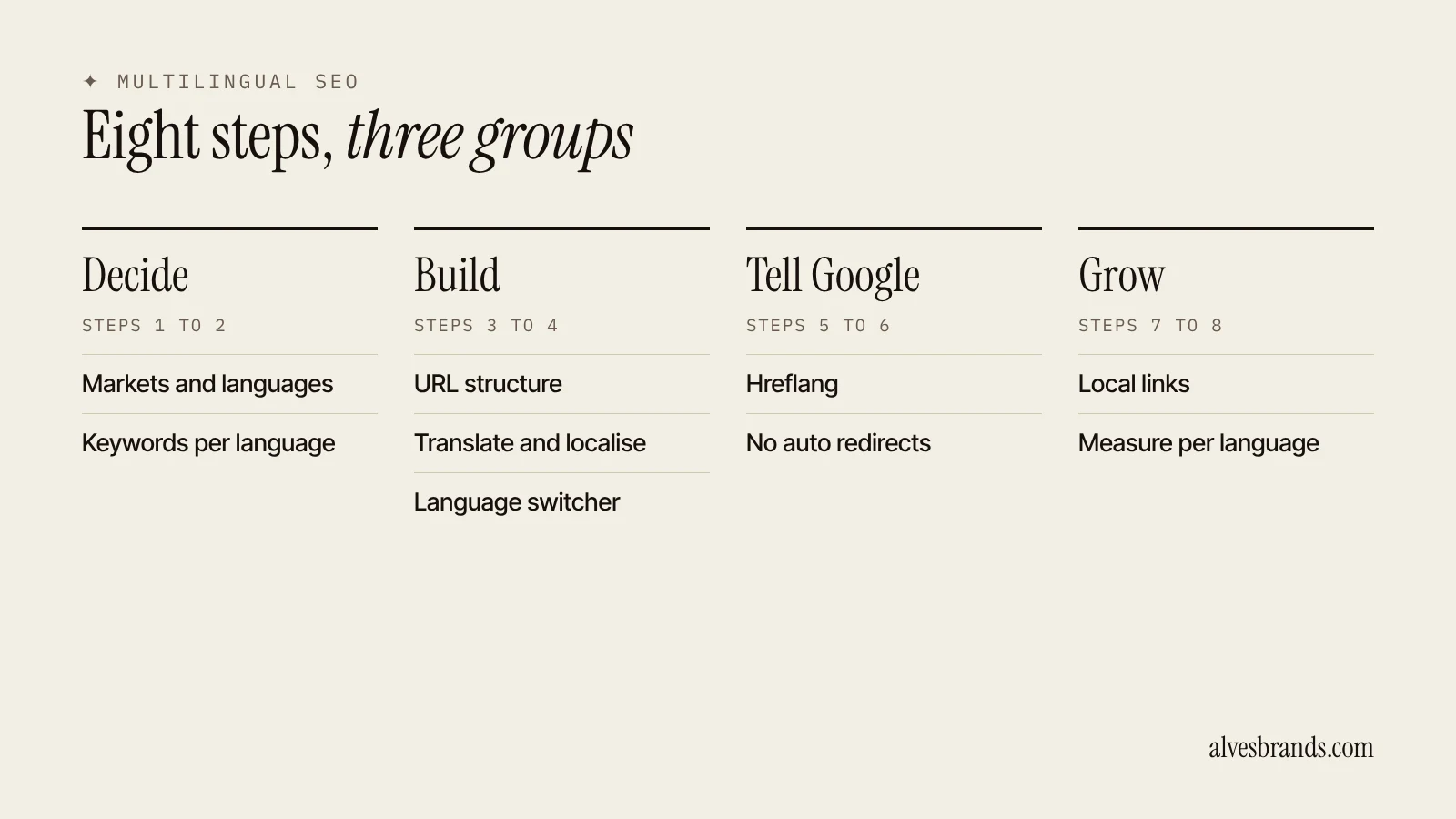
Weeks 1 to 2: Decide.
- Pick one or two markets from your enquiries and Search Console.
- Run keyword research in each language.
Weeks 3 to 6: Build.
- Translate and localise your home page, top products or services and contact page.
- Set up the URL structure and the language switcher.
- Add hreflang to every translated page.
Weeks 7 to 10: Grow.
- Ask for five links from sites in each market.
- Add the next five pages in each language.
- Fix the hreflang errors that Search Console shows.
Weeks 11 to 13: Check.
- Look at impressions, clicks and enquiries per language.
- Decide whether to add a third language.
Multilingual SEO checklist
- Markets and languages chosen from real data.
- Keyword research done in each language, not translated.
- One URL per language, in subfolders.
- Full translation of every visible part of each page, read by a native speaker.
- One language per page, with a visible language switcher.
- Hreflang on every version, with return links and x-default.
- No automatic redirects by language or by IP.
- Links from sites in each market.
- Search Console checked per language and per country.
Common multilingual SEO mistakes
- Translating keywords instead of researching them.
- Translating only the menu and the footer.
- Switching languages with cookies or by IP address.
- Redirecting visitors by language.
- Hreflang without return links.
- Publishing machine translations that nobody has read.
- Translating the whole site at once and keeping none of it up to date.
- Never checking results per language.
Should you do it yourself or hire help?
You can do the basics yourself: choose markets, translate your key pages and add hreflang. Hire a multilingual SEO consultant when you need keyword research in languages you do not speak, a site rebuild for subfolders, or many languages at once. You can see what I offer on my multilingual SEO page, with prices on the services page. Ask any provider who writes the pages, whether they are native speakers and how they report. See how to choose a manufacturing marketing agency for questions you can reuse.
Frequently asked questions
What is multilingual SEO?
It’s the work of ranking your website in more than one language. You publish full versions of your pages in each language, research the words buyers use there and tell Google which version is which with hreflang.
What is the difference between multilingual SEO and international SEO?
Multilingual SEO is about languages. International SEO is about countries and languages together, and it adds local links and signals. Many sites need both.
How do I do multilingual keyword research?
Research each language on its own. Ask a native speaker how a buyer searches, read the Google results in that country and group keywords by the pages Google shows. Do not translate your English list.
What is the best URL structure for multilingual SEO?
For most exporters, subfolders such as example.com/es/ are the best choice. They are easy to set up, keep your authority on one domain and work well with hreflang.
Do I need hreflang?
If you have the same page in several languages, yes. Hreflang tells Google which version to show to each searcher. Each version must list itself and all the others.
Can I use machine translation?
As a first draft, yes. A native speaker should read it before you publish. Pages made only to fill the site can break Google’s spam policies.
How many languages should I start with?
One or two. Pick the markets that already bring enquiries, and add another language when the first ones work.
How long does multilingual SEO take?
Usually three to six months before translated pages rank, longer in crowded markets.
Want help with your multilingual SEO? Ask me for a free website check. I’ll show you which languages and pages to start with.