A B2B SEO audit is a check of your website that shows why buyers do not find you on Google and in AI assistants, and ranks the fixes by what they cost you. A good one ends with a short list of actions, not a 60-page report.
This guide shows what a B2B SEO audit includes, the signs you need one, how to run a basic one yourself and what to ask if you hire someone. If you want me to do it, see my SEO audit for €199. For the full plan after the audit, read the B2B SEO strategy guide.
What is a B2B SEO audit?
A B2B SEO audit reviews everything that decides whether your pages show up for the searches your buyers make. It looks at your site, your content, your links and your competitors, and it answers one question: what is holding back enquiries from search?
B2B is different from a shop. Fewer people search, buying groups are bigger and each lead is worth more. Gartner says a buying group for a complex purchase has 6 to 10 decision makers. So a B2B SEO audit checks whether your pages answer the questions of each of them, not only whether Google can crawl the site.
Is a B2B SEO audit worth it?
Yes, when it is the first step of a plan and it ends in a fix list. An audit tells you where to spend. Without it, you can pay for pages and links while a blocked page or a slow site wastes the work.
An audit is not worth it when it is a tool report with 400 warnings and no priorities. A warning about a missing alt text on a footer icon is not a business problem.
Signs you need a B2B SEO audit
- Traffic fell after a redesign, a move to a new site or a Google update.
- Traffic is fine, but enquiries are not. Visitors come and nobody asks for a quote.
- Competitors outrank you for your main product, and you do not know why.
- You have never checked which pages Google has indexed.
- You pay for content or links and cannot see results.
If one of these fits, run the audit before you spend more.
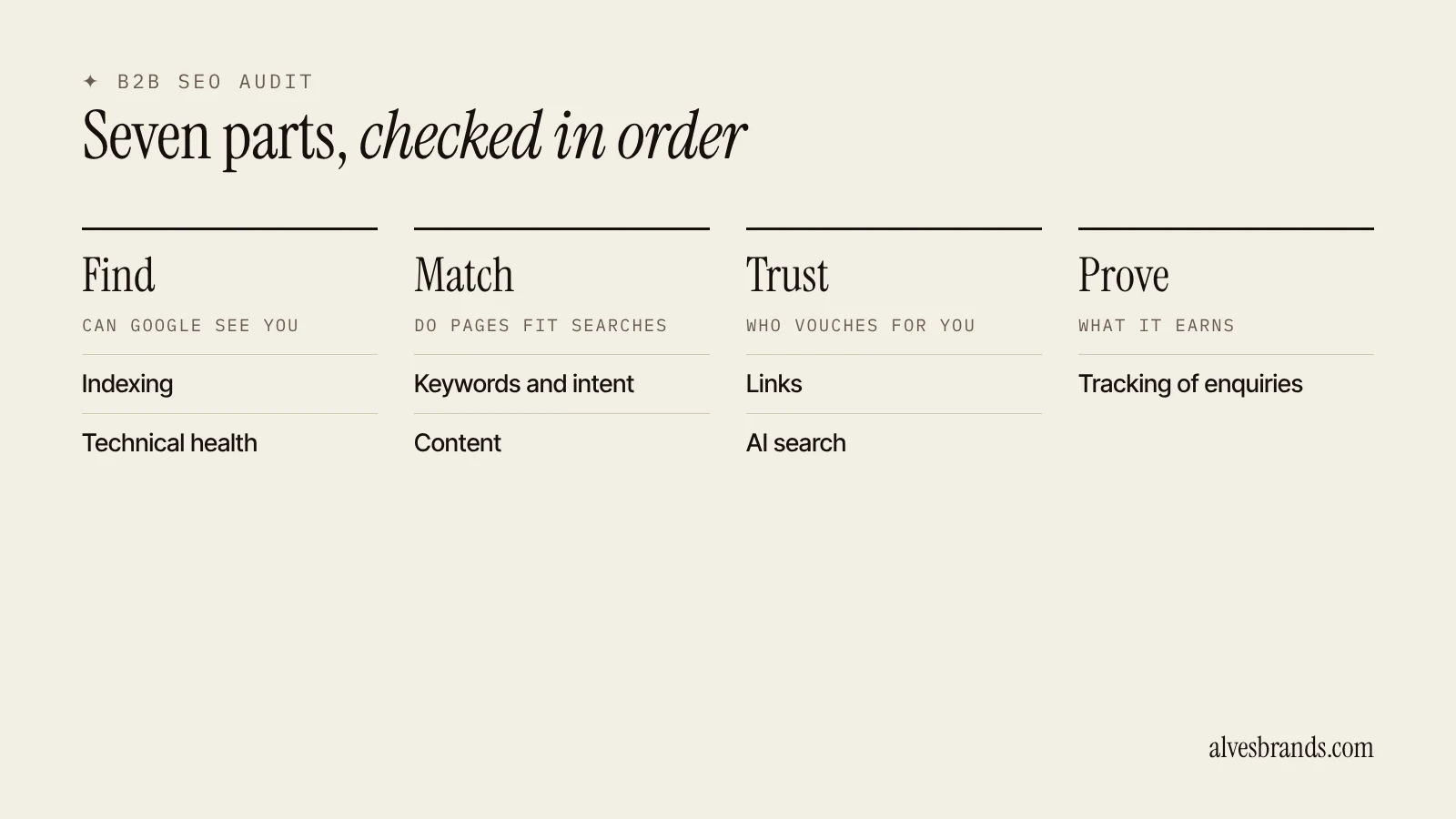
The 7 parts of a B2B SEO audit
1. Indexing
Check that Google can find and list your important pages. In Google Search Console, open the pages report and look for pages that are "not indexed". Check your robots file and your sitemap. A page that is blocked or not indexed cannot rank, so this comes first. Google explains how it finds pages in its documentation on crawling and indexing.
2. Technical health
- Speed on a phone, using a page speed test.
- Mobile layout: readable text, buttons easy to press.
- One address per page, with a self-pointing canonical tag.
- Redirects for old addresses, with no chains.
- Clean URLs and working internal links.
- HTTPS everywhere.
For deeper fixes, see my technical SEO page.
3. Keywords and search intent
Check which searches each page is meant to win, and whether the page matches what Google shows for that search. Search your main products and read page one. If it shows service pages and you have a blog post, you have the wrong page type. If two of your pages go after the same search, they compete with each other.
4. Content and on-page SEO
For each important page, check:
- The title is clear, unique and near 60 characters, with the main search first.
- One H1 and a logical order of headings.
- The page answers the buyer’s questions: specs, uses, certificates, lead time, price range and how to order.
- Specs are in an HTML table, not in an image.
- There is a quote form or contact button above the fold.
- The text is original and not copied from a maker or a competitor.
5. Links
Look at links in two directions. Internally, check that key pages get links from other pages with clear anchor text. Externally, check who links to you and who links to your competitors. Then check for bought or spammy links, which Google’s spam policies warn against. For a plan to earn links, read B2B link building.
6. AI search
Ask ChatGPT, Gemini and Perplexity the questions your buyers ask and note which companies they name. Check that your pages state facts plainly (who you are, what you make, where you ship) and that your company details match across your site and profiles. Google says there are no extra requirements for AI features beyond helpful, indexable pages. See how to get recommended by ChatGPT. Want to see how you show up today? Run the free AI visibility check.
7. Tracking
Check that Search Console and analytics work, and that you can see quote requests by source. If you cannot tell which page brought an enquiry, you cannot tell what to fix.
Examples: what an audit finds
| Finding | Why it costs you | The fix |
|---|---|---|
| Product pages blocked after a redesign | Google cannot list them | Remove the block, resubmit the sitemap |
| Same title on 200 pages | Pages look identical to Google | Write a title per page |
| Specs in images | Neither Google nor AI tools can read them | Move specs to an HTML table |
| Two pages for one search | They compete with each other | Merge, or give each its own search |
| No quote form on product pages | Visits do not become enquiries | Add a short form and WhatsApp button |
| No tracking of enquiries | You cannot tell what works | Record the source and landing page |
How to rank the fixes
An audit finds many problems. Do them in this order:
- Blocks. Anything that stops Google from listing your pages.
- Money pages. Fixes on the pages closest to a quote request.
- Quick wins. Titles, headings, specs and internal links on pages that already sit on page two.
- New pages. The searches you do not cover.
- Links. Once the pages deserve them.
- Hygiene. Small things, last.
Score each fix by what it costs you if left alone and how long it takes. Do the high-cost, quick ones first.
In-house audit vs agency audit
| In-house | Agency or consultant | |
|---|---|---|
| Cost | Your time and free tools | A fee |
| Best for | Small sites, a first look | Large sites, a second opinion |
| Risk | You miss what you do not know to look for | A generic report with no priorities |
| Needs | Search Console, a crawler, a spreadsheet | A clear scope and a fix list |
You can run the checks above yourself with free tools. Hire help when the site is large, when you have tried and traffic did not move or when you need someone to rank the fixes by their effect on enquiries.
What a B2B SEO audit should include when you hire it
- A review of indexing, technical health, content, links, AI visibility and tracking.
- Keyword and competitor checks based on Google results, not only a tool.
- A ranked list of fixes with the page and the fix for each.
- A plan for new pages, with one search per page.
- A call or video that walks you through it.
Ask who does the work, how long it takes and whether the report is yours to keep.
What my B2B SEO audit includes
My audit costs €199, one-off. You get a 10-minute video walkthrough and the 10 biggest problems ranked, with the fix for each. It is delivered in 5 working days. If you hire Growth within 30 days, the audit price is credited against your first month. See the services page.
How long a B2B SEO audit takes
A small site takes a day or two to check. A large catalog takes longer, because you check by page type and not page by page. Fixing takes longer than finding: blocks and titles can be done in a week, new pages and links take months.
How often to run a B2B SEO audit
Run a full one once a year, and a short one after every redesign, platform change or big drop in traffic. Check indexing and tracking every month in Search Console.
Quick wins to look for in a B2B SEO audit
Some findings pay back in days. Look for these first:
- Pages on page two of Google, where a better title, clearer headings and two internal links can move them up.
- Pages with a high number of impressions and few clicks, where the title does not match what the searcher wants.
- Important pages with no links from other pages on your site.
- A quote form that is hard to find or fails on a phone.
- Old pages that now redirect twice or return an error.
Send these to your developer in one list, with the page address and the fix for each. A short, exact list gets done. A long report gets filed.
Who should read the B2B SEO audit
The owner or marketing lead reads the ranked list. The developer gets the technical part. The writer and the engineer get the page fixes. Give each fix a name and a date, otherwise it stays on paper.
B2B SEO audit mistakes to avoid
- Trusting a tool score. Scores do not know your buyers.
- Fixing everything. Some warnings do not matter. Rank by cost.
- Skipping the Google check. You must see what ranks for your searches.
- No owner for the fixes. A report that nobody acts on is wasted money.
- Auditing once and never again. Sites change, so checks must repeat.
Want a quick first look? Use the free website enquiry check.
Budgeting the work after the audit? See manufacturing SEO cost.
Frequently asked questions
What is a B2B SEO audit?
It’s a review of your website, content, links and competitors that shows what stops buyers from finding you on Google and in AI assistants. It ends with a ranked list of fixes.
How much does a B2B SEO audit cost?
Prices vary widely, from free tool reports to several thousand euros for large sites. Mine costs €199 for a one-off audit with a video walkthrough. Ask any provider what the price includes.
How long does a B2B SEO audit take?
A basic audit takes one to five days, depending on the site’s size.
What does a B2B SEO audit include?
Indexing, technical health, keywords and search intent, content, links, AI search visibility and tracking.
Can I do a B2B SEO audit myself?
Yes. Use Search Console, a page speed test, a crawler and Google itself. The checks above cover the basics.
What do I do after the audit?
Fix the blocks first, then the pages closest to enquiries, then add new pages. Read the manufacturing SEO checklist to track each fix.
How do I know if my site is healthy?
Your important pages are indexed, they load fast on a phone, each matches a real search and you can see enquiries by source. If any of these fail, start there.
Want me to audit your site? Ask me for a free website check or book the €199 audit. I’ll show you the biggest problems first.